We are surrounded by detail each and every day. This causes us to lose sight of the simple fact that the simpler our message, the more effective our message. So how do we simplify our message?
I am no expert, but throughout my 35 years as a school business official, I have done a lot of research about presenting and persuasion and have developed 10 tips that can help you make complicated financial topics more understandable to non-financial people.
A well-designed cover slide sets the tone of your presentation and should scream of the quality to come.
Tip 1: Match Medium to Message
When we are asked to do a budget or financial presentation, we immediately go to work on a PowerPoint. There isn’t necessarily anything wrong with that but you need to be aware that there may be better mediums for conveying your message.
For instance, Prezi is a slideshow software that uses motion, zoom, and special tools to make your presentation more conversational. Prezi’s non-linear format allows you to zoom in and out of topics, adapting to your audience on the fly when you are presenting a lot of information and you don’t know which topics will require a deeper dive.
I also recommend a presentation style called Pecha Kucha, or “chit chat” in Japanese. When you have a topic that you need multiple presenters to be on point with, like bond referendum presentations, this is the style to use. You have 20 slides that automatically advance every 20 seconds, requiring the message to be concise, consistent, and fast-paced. KISS.
Tip 2: Pictures Before Words
Remember the old saying that pictures are worth a thousand words? In our brains, visuals trump words. The human brain deciphers image elements simultaneously while decoding language in a linear, sequential manner, taking more time to process.
Words are processed by our short-term memory, which can only retain about seven bits of information (hence the reason for a 7-digit phone number). However, images go directly into long-term memory where they are indelibly etched. That’s why it is not surprising that it is much easier to show a circle than describe it as “a curved line with every point an equal distance from the center.”
Research shows that our brain processes visuals 60,000 times faster than text; so, if you don’t turn to design techniques to help explain complicated financial topics, you are fighting 30,000 years of hardwiring in the human brain. More and more, professions that rely heavily on communication and persuasion are embracing graphics as the tool of choice. Case in point: trial attorneys.
Tip 3: Be Original
The topics that school business officials present or discuss are complicated. Usually, you can’t just search a topic and come up with a simple, visual explanation for the topic; you have to step out of your comfort zone and be more of a designer than an accountant.
For example, my new board members struggle with the concept of a mill and dividing assessed valuation by $1,000 before applying the mill rate in calculating the tax. So, I came up with the imagery and terminology of the “Cleveland.”
President Grover Cleveland was on the face of the $1,000 bill when it was in circulation. Rather than show assessed values and formulas to calculate the tax implication, I talk about and illustrate “Clevelands”: how many more we have due to assessed valuation growth and what that growth means to the taxpayer. Simple, but effective.
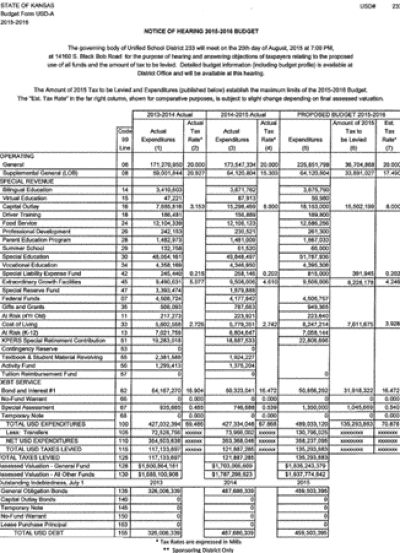 Figure 1. A chart with too much information that’s too hard to read.
Tip 4: Start at the Beginning
Starting at the beginning is all about grabbing your audience’s attention immediately. The cover slide is the most underutilized slide in a presentation. It has to have visual appeal, set the tone, create cohesiveness and professionalism, or you risk losing your audience before you’ve begun.
A well-designed cover slide sets the tone of your presentation and should scream of the quality to come. Use it wisely to create immediate interest in your topic.
Tip 5: Boot the Bullets
If you can’t boot bullets from your presentation, minimize them. Use bullets to convey key information, not tell the whole story. Your audience won’t remember 10 bullet points, but they will remember 10 compelling slides.
A great rule of thumb to keep your slides compelling is to present one idea per slide and no more than six lines of text per slide. Generally, the information we present isn’t very sexy. Reading a wordy slide makes a bad situation worse. Conveying only key information will also prevent you from reading your slide and help you convey its meaning, leading to better understanding.
Tip 6: Be a Freud of Fonts
Typography is a major art form in the design world. Typefaces communicate mood. Put some thought into your selection, and know that the human brain reacts differently to different fonts. For example, Times New Roman is received by the human brain as formal and professional, while Arial is received as modern and clean.
Some rules of thumb about fonts are to reserve creative fonts for titles rather than the body; for the body, stick to traditional typefaces like Arial; and always use bold text for readability against dark backgrounds.
Tip 7: Treat Charts Like Garlic
Charts are a great tool to reduce a lot of information into manageable pieces. But don’t get carried away with them. My wife’s Sicilian grandpa used to say that “kids should be like garlic, present but not overbearing.” Treat your charts like garlic.
We are all pretty versed in the use of charts, but here are a few good rules of thumb to keep in mind:
• Pie Charts. Great for showing percentages. Limit the number of slices to 4–6 and contrast the most important slice with color or explosion.
• Vertical Bar Charts. Perfect for showing changes in quantity over time. Limit bars to 4–8.
• Horizontal Bar Charts. Used to compare quantities. Same limits as vertical bar charts.
• Line Charts. Excellent for demonstrating trends. Limit lines to 4–6.
Similarly, be leery of putting large tables and spreadsheets in your presentations. If you ever think you are going to have to say, “I know you can’t read this, but if you could…,” don’t show it. Don’t try to present information like that presented in Figure 1. Break it up into smaller increments. Remember, you have to keep their attention, and to do that, your slides must be compelling.
Tip 8: Color Like a Kindergartner
Proper color usage in your presentation can go a long way to simplifying your message. Studies show that color usage can increase interest and improve learning comprehension and retention. Colors are divided into two general categories: cool colors (blue and green) and warm colors (orange or red). Cool colors are better for backgrounds as they appear to recede away from us, while warm colors generally work best for objects in the foreground, such as text.
There is a rule of thumb in presentation design that says you should use five or fewer colors. This is called a harmonious color palette. Harmonious color pallets can help cut through the complexity of your topic
Tip 9: Video/Audio—Hold the Cheese
Always remember, you are trying to connect with your audience and have them really understand what you are talking about. Don’t distract them with cheesy animation or audio sound effects — they discredit your real message. Find other ways to be creative using imagery.
Tip 10: It’s OK to Laugh
School business officials present some heavy, boring stuff. Humor can get our message across. Whether you are horrible at delivering witty one-liners or are a natural-born comedian, letting your slides handle the humor eases the pressure of being on stage.
Roaring laughter from your audience is not the goal, but an occasional smile from a few audience members goes a long way toward showing they are paying attention.
Remember
Simplicity is key. The average PowerPoint contains 40 words per slide. That’s too many. Steve Jobs of Apple used 19 words across 12 slides when introducing the first iPhone. KISS.